
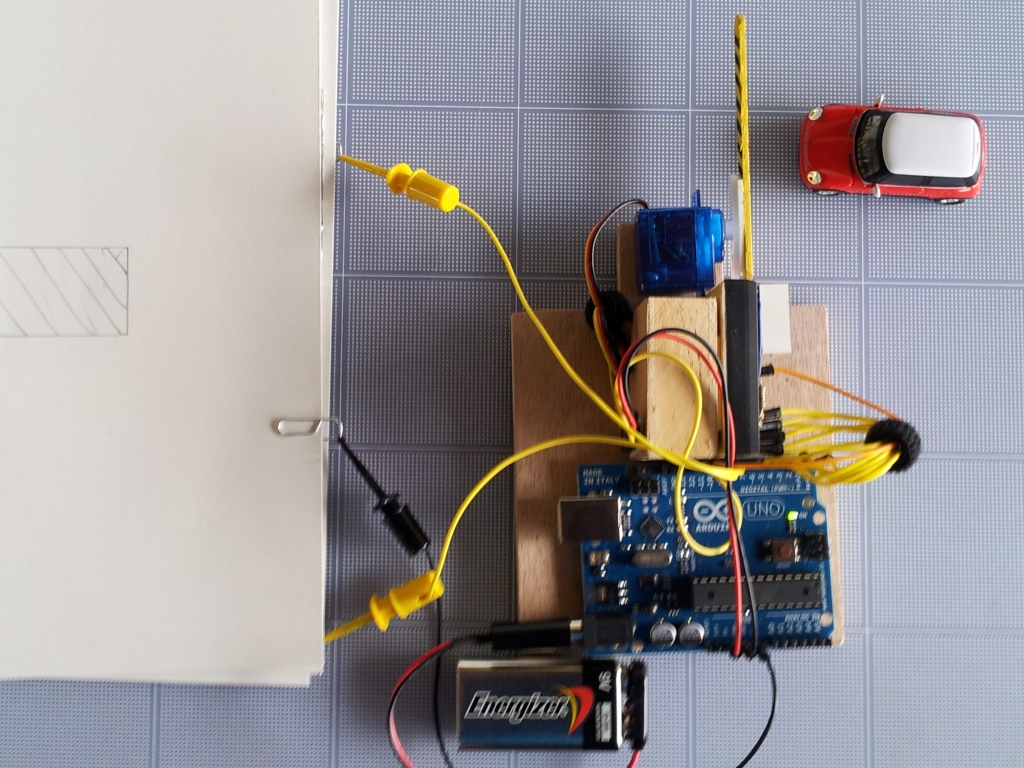
Wiring diagram:

Here is the code:
/*ParkingL02.pde
Arduining.com 08 JUL 2012
Code used in the production of the Youtube material.
*/

#include <Servo.h>
Servo myservo;  // create servo object to control a servo

#define ServoM    12        //Connected to the servo motor.
#define Bright    11        //servo library disable PWM on pins 9 and 10.
#define Exit      9         //Pin connected to the EXIT button.
#define In        8         //Pin connected to the IN button.

#define BarLow    177       //Low position of the barrier.
#define BarUp     95        //Up position of the barrier.
#define CAPACITY  8         //Capacity of the parking lot.
#define INTEN     80        //Display intensity %

//Pins conections to segments (cathodes).
#define  segA  0
#define  segB  1
#define  segC  2
#define  segD  3
#define  segE  4
#define  segF  5
#define  segG  6

//Array with the segments to represent the decimal numbers (0-9).
byte segments[10] = {
// pgfedcba  <--- segments
  B00111111, // number 0
  B00000110, // number 1
  B01011011, // number 2
  B01001111, // number 3
  B01100110, // number 4
  B01101101, // number 5
  B01111101, // number 6
  B00000111, // number 7
  B01111111, // number 8
  B01101111  // number 9
};

void setup(){
  myservo.attach(ServoM);          // attaches the servo.

  pinMode(Exit, INPUT);           // set "EXIT" button pin to input
  pinMode(In, INPUT);             // set "IN" button pin to input
  digitalWrite(Exit, HIGH);       // Connect Pull-Up resistor.
  digitalWrite(In, HIGH);         // Connect Pull-Up resistor.
  pinMode(segA,OUTPUT);
  pinMode(segB,OUTPUT);
  pinMode(segC,OUTPUT);
  pinMode(segD,OUTPUT);
  pinMode(segE,OUTPUT);
  pinMode(segF,OUTPUT);
  pinMode(segG,OUTPUT);
  pinMode(Bright,OUTPUT);
  analogWrite(Bright,255*INTEN/100);
  myservo.write(BarLow);          //Barrier in the low position
//  delay(1000);
}

int  Available= 9;                    // Number of places available.

//================================================================
void loop(){
Display(Available);
if(digitalRead(In)==0)
{
  if(Available != 0){
    Available--;
    myservo.write(BarUp);
    delay(3000);
    myservo.write(BarLow);
    }
  }
if(digitalRead(Exit)==0)
{
  if(Available != CAPACITY){
    Available++;
    myservo.write(BarUp);
    delay(3000);
    myservo.write(BarLow);
    }
  }
}

/*-------------------------------------------------------------------
Put the segments according to the number.
--------------------------------------------------------------------*/
void Display(int number){
byte segs =  ~segments[number];        //"~" is used for commom anode.

digitalWrite(segA, bitRead(segs, 0) );
digitalWrite(segB, bitRead(segs, 1) );
digitalWrite(segC, bitRead(segs, 2) );
digitalWrite(segD, bitRead(segs, 3) );
digitalWrite(segE, bitRead(segs, 4) );
digitalWrite(segF, bitRead(segs, 5) );
digitalWrite(segG, bitRead(segs, 6) );
}
See it in Youtube:
and how was done:


Nice! Why not use cap sense Library and use a small metallic plate at the entrance?
Cheers Kim
Thanks, I’ll do some experiments using your idea.
hi friend, how i can manage 99 lots ? where i have to change the program ? i do not know very much about arduino programming…thanks in advance
if io want to use hc-sro 4( distance sensor) and LCD(LiquidCyrstal)
how must i connect these to arduino
and
how must i write codes??????????
please help me …i will go to competition about arduino
Goo job!
nice project. wanna ask, what material used to build the switch pad?
Aluminium foil, you can find it at the supermarket. Check the second video.
Awesome project.
Where did you get the servo rotor?
Amazon, Sparkfun, Robotshop, dealextreme, adafruit, Plolu, eBay,
I have used all of them sucessfully…
Hi friend
I want do it for 99 psrking with two seven segment
How i can do it ??
Nice Job!!! What kind of sensor did you use and how was it connected?
hello can you email me the full program for your project im doing a similar project and I need some help
Would it be possible to use two touch sensor for the entrance and exit?
Gostei do seu projeto, mas fiquei com algumas duvidas… o material que vocẽ usou para colocar no piso do estacionamento é papel cartão?
Estou iniciando meeessssmmmmoooo na área da robótica e preciso saber o nome dos pinos que você usou para plugar no clips…
Obrigada!!!!
Não falo muito portugués.
-Yes is cardboard.
-Look for “minigrabbers” in google images…
Obrigado Márcia por visitar meu blog.
I don’t understand these lines…
B00111111, // number 0
B00000110, // number 1
B01011011, // number 2
B01001111, // number 3
B01100110, // number 4
B01101101, // number 5
B01111101, // number 6
B00000111, // number 7
B01111111, // number 8
B01101111 // number 9
How to identify those “B00111111″???
and this one” analogWrite(Bright,255*INTEN/100);”
I hope you can somehow explain some lines on the code… I’m a newbie.
1234 – decimal number
01234 – octal number
0x1234 – hexadecimal number
0b0101 – binary number
Can you please provide this in Proteus?
An array of 10 bytes was declared and the name of the array is segments.
byte segments[10] = { ….
Then the array is filled with bytes in binary format (8 bits).
The bit values correspond to the state of the segments a,b,c,d,e,f and g of the display to represent numbers from 0 to 9. Note that bit 7 is always 0 because the decimal point (p) is not used in this application.
To change the intensity of the display, a PWM signal is used in the common of the display.
analogWrite(Bright,255*INTEN/100);
“Bright” is the pin of the display where all the leds are connected (the common).
when I said:
#define Bright 11
at the beginning of the code, it means that every time you see the word “Bright” in the code,
it will be replaced by “11” before the code compilation.
Also:
#define INTEN 80
is used to change the display intensity.
With this in mind:
analogWrite(Bright,255*INTEN/100);
is the same as:
analogWrite(11,204);
The expression 255*INTEN/100 was used to specify INTEN as percentage.
Hope it helps…
thanks very much, you help me to!
is there a program for arduino uno using double seven segment display. i’m having a hardtime fixing my script.. please message me fast!
hi there, could you do an example using a wireless RF remote
love this project…so cool
sir can we use a 16 segment led display in this project?
I see no problem with it. You’ll need the analog pins as digital outputs to drive all the segments.
how are we going to use that sir? sir can you give us the code that decreases the number of vehicle in the display everytime they exit?thank you sir more power
sir can you please give us the materials and circuit diagram that you use in that project?thank you very much sir
hello, i have a problem with this part
void loop(){
Display(Available);
if(digitalRead(In)==0)
it says ‘Display’ was not declared in this scope. what should i do?
i just started using arduino TIA
Could you solve your problem? I have the same trouble
Check that you have the function:
void Display(int number){
…
at the end of your sketch.
Sir, i want to know the type of servo?
Hitech HS-55 or similar.
que tipo de servomotor voy utlizar
hello hear that type of servomotor is used
instead of aluminium foil..,, can we replace with a push button switch..,,,???
Yes, actually the aluminium foil is acting as a switch.
Hello, what material used to build the switch pad?
if we got to increase the number of cars in the lot (say 20)..,, what changes should me made.,, in program and displaying…,,
Please reply, as I have problems with the 7 segment display, my 7 segment display is fully working but segment A or the upper segment is not lighting.
I have reversed the code you used into:
B1000000, // number 0
B1111001, // number 1
B0100100, // number 2
B0110000, // number 3
B0011001, // number 4
B0010010, // number 5
B0000010, // number 6
B1111000, // number 7
B0000000, // number 8
B0010000 // number 9
Using your schematic diagram with YOUR code, the lights are reversed, so I reverted the code into this, Because I’m using an anode 7 segment display. and its working but my problem is that the pin for segment A is not working. From my tests, the 7 segment display is working, my wires are working, the resistor is also working, the pins of the arduino are also working, Does disabling the PWM pins has something to do with this?
Does this comment,
//Pins conections to segments (cathodes).
means the pin connection is for cathode only?
Your fast reply is highly appreciated. Thanks in advance! 🙂
Maybe wrong common anode or cathode verify
PS.: Even with the 1s in the start of each array, (for the decimal point which is not in use in the code) the segment A or the topmost segment of the 7 segment display isn’t working. 😦 Please help. Thanks.
Try changing only the line:
byte segs = ~segments[number];
to:
byte segs = segments[number];
dear same problem with my project if u removed this problem plz help me thanx in advance
good afernoon sir, I’m curious about the aluminum foil. It is the switch pad right? How does it work? Can you explain how is it connected with the circuit. Thank you.
Common aluminum foil glued to cardboards.
Minigrabber test leads to connected the paperclips to the Arduino.
See the second video “The making…”
Sir, can you please provide the sevro motor specifications.
The Hitech HS-55 was used in this project any standard or mini servo can be used, just do some experimentation to find the correct values to the UP and DOWN position of the barrier.
dear sir,, i am murali. and I wonder if you can spare your precious time for me. We are doing this as our mini project. review seminars are on progress. if we may be asked a question like “why are you using arduino UNO only..?” what should we answer them..?
please help us.. thanks in advance
Hi murali, you can use any Arduino compatible board like: UNO, Duemilanove, Leonardo, Due, Mini, NANO etc..
I’ve encountered a problem. When the input is hold on 0 the count continuously decrease.
After giving input,it is automatically decrementing to 0.I think u have faced the same issue.Can u help me in finding the solution?
what king of display did u used
if I want to used 2 servos for this project one the entrance and the other one for the exit. would you tell me what kind of change I can do in the cade
It’s perfectly possible and a very good idea.
You have to declare two servos:
Servo barrierEntrance;
Servo barrierExit;
Hi dear
Pls could you mention all the components that u used in this project
With the specific name and details?
Please i am waiting ur reply as soon as possible
dear sir,, what are the limitations of this project??
hallow sir, please send me a circuit operation and circuit diagram of this project
Dear sir,. this is murali, We have completed this as our mini project. Today there was a expo, we have clearly demonstrated the project. During expo we came across with few situations
1) The cars will be entering into the lot and the lot is filed. When the lot is filled, the vacant spaces are zero and no car is allowed to enter. Now, the power is gone. (we used adapter 12v, 1.5amps) and comes back. Then the seven segment display shows the maximum count, though the lot is filled. means the arduino is allowing the others cars to enter the lot.
2) Now the another one, the car is ready to enter the lot. The car approaches the gate and gate opens up. Now the driver is in urgency and left. Though the car has not entered the lot, the count is decremented.
3) Car reaches the gate, aluminium foil comes in contact and gate opens. Though the gate is open, the driver doesn’t enter. means when the aluminium foils are continue to remain in contact then the count keeps on decrements and after reaching zero the gate closes.
4) when at a time two cars one after the other tries to enter the lot, then how can you prevent the overcrowding.?
5) when two cars one leaves the lot and other enters, approaches the gate at same time. What will be the situation.?
When we were asked questions, we were helpless and told them that this is a prototype version, if we are interested then we can go much deeper and come up with beautiful solutions.
and we were are also asked
6) when two aluminium foils come in contact, will arduino recieves a pulse or a electric signal.?
7) How the arduino is providing 5v power suppy to servo motor.?
8) Explain the architecture of arduino.?
how an aluminum foil work?
What sensors are used ?
QUIERO COMPRAR UN PROJECTO ECHO CON ARDUINO, UN PARKING
hey sir,can I use mini srvomotor towerpro SG90 9G??
looks perfect to me.
Hey, i want to connect the parking lot to a ultra sound sensor not a tipe of button, can you help pls?
please i need the code
What are the materials needed??
List of materials:
-Arduino UNO
-RC Micro Servo (Hitec HS-55 or similar)
-7-Segment Display Common anode.
-470 ohms resistors 1/4 w 5% (7)
-Mini breadboard 170 points
-cable jumpers Male-to-Male (14)
-Solid wire AWG #22 (breadboard jumpers)
-cardboard
-aluminum foil
-paper clips (3)
-Wooden Coffee Stirrer (the barrier)
-White glue…
if we used common cathode then what will be the changes
What kind of sensor did u use sir ?
Can I do this project for 100 cars is not for … 8 cars will be on the amendment to the compiler code is not it? !
What are the things you have used to attach with paper clip
Google: cable mini grabbers
And send me the diameters of the base and the foil pad switch
Check the video: https://www.youtube.com/watch?v=4mJC-9UPDFw 0:47
There are rectangular holes, 3.5 x 6 Cm. (1-1/2″ x 2-1/2″) aprox.
Can we use towerpro sg90 servo
towerpro sg90 servo is perfect.
how yo made the foil switch
Cardboard and aluminum foil push pad:
XXXXXXXXXXXXXXXXXXXXX <– Cardboard
********************* <—White glue
===================== <—Aluminum foil
XXXXX……….XXXXXX <—Cardboard with the window
===================== <—Aluminum foil
********************* <—White glue
XXXXXXXXXXXXXXXXXXXXX <– Cardboard
can we use aligator wires
Good idea (don’t need the paperclips)
is the cardboard of wood or paper
Can i use towerpro mg996t digital servo..one more thing can i use 7 segment led common cathode??
sir i am very much interested in your project
can u pls provide us the ckt diagram
how it is connected ????
servo motor and display does not work at a same time…….Need help
If you are using a 9V battery, may be not enough to power the servo. Use the USB cable or an external power adapter.
i have use usb cable but it doesn’t work when servo motor start working the display get turn off and does not show decremented or incremented value……….kindly help me
Looks like your servo is a little big or is blocked..
Hi Sir, How to separate the entrance and exit 2servo ? how does use the codes ?
Cause when the car is left standing at the entrance down automatically display up to 0
Yes Nick, it’s a simple project with a lot of room to improve.
I need some information for this idea , can you help me becouse i will write report about this idea
Nice sir… Good job
sir please help me for this project. from video i am not getting how you have connecting all the materials. like what’s the use of aluminium foil? I didn’t get that
Sir in diagram, what is the resistor do you use in seven segment display 470 ohm or 470 kilo ohm?
470 ohms
Hi, could you tell me how switch pad works? and… when two aluminium foils come in contact, will arduino receives a pulse or an electric signal?. Thanks for your help,
good day sir.. may i ask. i can’t understand the lines:
#define BarLow 177
#define BarUp 95
what is the significance of 177 and 95? or why 177 and 95? can we give another values? thank you in advance for your response.
how we can know about components range
nice
I need some information for this idea , can you help me becouse i will write report about this idea
Hi, Sir. What if we want to use a double seven segment so we can have atleast 99 cars in it. What changes will we make in the program? Thanks. Hoping for your reply.. ASAP.
hi sir we are making similar project by using arduino UNO, rfid, servo and lcd 16*2 to display. What code do we need for lcd to display ? Or we just need thid code for servo motor. I am completely new to hardware.
sir we are using lcd 16* 2 and rfid along with servo and arduino. we are not using resistors. What code do we need for lcd display ?
Hi great project, just a small question.
For a GCSE project I’m doing a similar design to yours in that a car enters the no. Of available spaces lowers and when a car exit it rises. I’m also using the arduino however my project will also display and count disabled drivers entering and exiting the car park. I hope to run two arduinos, one for standard drivers and one for disabled both boards will be connected to exit and entrance switches and 7 segment displays. Here’s the question, would it be possible to connect both boards (coded the same) to the same single servo motor.
can you send me the schematic of the circuit of breadboard of 7 segment display
i am not able to figure out, how u made the switch button using aluminium foil. can u plz help me out sir?
Can I ask if what programming language did u used?
Can we have your research papers about this.,? Thank you and Godbless
Hy
Please the programm of a parking with the servo motors ( one for tthe in & one for the out) it’s same working like ur programm
which component is requied for this project ?
im using photoresistor to detect the presence of a car , but i didn’t know how to connect it via the aluminium foil , and i didnt know also where your buttons are in you shema ???
I created the whole project. the numbers work perfect. As i was having problem with Servo overloading the arduino so googled and solved it by attaching an external source with a common ground between the arduino and the servo motor.
I tried this configuration with a Sweep program and it works perfect.
But with the parking lot program it keeps rotating till the car hits the circuit whether in or out. When the car hits the circuit it still rotates but at a much lower speed. then after 3 secs it again gains the previous speed.
The servo never stops. The numbers work perfect but servo is giving me headache…
I have a feeling the programming might need tweaking
Please help…..
please anyone send me more details about this project to this mail srnarendra100@gmail.com plz…
ola, como metes a cancela a levantar, nao se percebe muito bem
obrigado
Hi
can you tell me if i want to use in and exit as a separate door then how to attach a another servo motor to it??
please help me i need it As soon as possible.
thanks
NIK..
nikhileshvyas20@gmail.com
What are the components required to make ur CAR PARKING LOT Project ?
I want Details about Switch Pad experiments works with arduino uno.
hi sir i am Wilson, can i have to full component list of this project? as i’m doing something similar to this for my final year project. will be much appreciated if helped thanks 🙂
great project by the way !
Hola quisiera saber por que no prenden el 7 segmentos algunos segmentos encienden otros no :c, usted utilizo anodo comun o catodo comun?
How can I use double digits, for a bigger parking lot?
Help please
USE LCD , IN PLACE OF 7 SEGMENT DISPLAY
could any body can help me in understanding the specification of this project . like output power, input power,current ,voltge used etc….
Hi there !
You did a great job !
I am new to Arduino and I don’t understand this part . If you help me , it would be much appreciated .
void Display(int number){
byte segs = ~segments[number]; //”~” is used for commom anode.
digitalWrite(segA, bitRead(segs, 0) );
digitalWrite(segB, bitRead(segs, 1) );
digitalWrite(segC, bitRead(segs, 2) );
digitalWrite(segD, bitRead(segs, 3) );
digitalWrite(segE, bitRead(segs, 4) );
digitalWrite(segF, bitRead(segs, 5) );
digitalWrite(segG, bitRead(segs, 6) );
}
Thank you !
utilizo display de anodo comun o catodo comun?
No meu projeto passado pouco tempo a contagem começa de novo. Alguem me pode ajudar? obrigado
In my last project soon the count begins again. Someone can help me? thank you
In my last project soon the count begins again. Someone can help me? thank you
if i want to use hc-sro 4( distance sensor) and LCD(LiquidCyrstal)
how must i connect these to arduino
and how must i write the codes???????
please help me….
hi sir , i would like to use a pir sensor instead of aluminium foil . how am i suppose to change the coding..thank you
sir, what program should i write to test the display separately?
should i connect the seven segment display the way its described? because online when i looked up it was giving me diff pins
do i have to have a switch pad in order for it to work?
Sir, im planning to do this as my mini project. Currently im using Arduino software for program execution but im not getting any output. Kindly mail me your code. Your help will be very valuable. If not arduino, keil code will also be helpful. Thank you.
d
can u please tell me where are you connecting the switchpad wires in the arduino?
Can you please tell me the names of components used??
Please mail me the components required
can i use MG995 servo instead of HS-55 ????
Hi Iam going to try this circuit and the common anode display is not available so can I use the common cathode display ??? and if I can then how could I do please send me a feedback.
Connect the display’s common to 5V and change the line:
byte segs = ~segments[number]; //”~” is used for commom anode.
To this:
byte segs = segments[number]; // “~” was removed for commom cathode.
Can you please send the circuit diagram of the parking system using aurdino with the sensors we are not getting the perfect circuit diagram of it please send the circuit diagram using ATMEGA32 send as fast as possible I need within this week.
What is the working principle behind it ?? Explain briefly
What is the working principle behind parking lot system? Explain in detail
what will be the changes if we use common cathode in place of common anode display, and plese give the code for the same.
hello sir,i am a class 8 student .i am facing problem with the connection with the common anode display.can you plz tell me what is pwm.plz sir, i have to submit it within 16 days
PWM is Pulse Wide Modulation, can be usen to change the display intensity.
but can you plz tell me which pin is pwm pin
Good day sir.. may i know the different types of materials did you use on this project.
sir,which version of software should we use to run this code?
Can I ask some question? I have a problem with segment led display because it blinks or each segments shine not as they should. Do you know where could be a problem?
can we use lcd in place of led if it possible please give me source code
Why our 7 segment display is not changing number either decreasing or increasing…please give some feedback…tq
hello. im suha. im using your project for my mini project assignment. but the software not run and the 7 segment does not display the number. why?
hi sir
if i want to increase the number of parking’s
what change i have to do…
in code and components ?
Hello Sir, I am pursuing Diploma(6th sem) and I have to submit a major project so I think this is a best project which can I present in College.1:-I have to ask that the code which you written above is error free or not? & 2:- Which version of Arduino Software you used for write the code?
Plese sir reply me as soon as possible.
hey what software that you use to draw / simulate the program ? Sorry bad english
Hello sir, i’ve watch your project on youtube and what i could say is it is awesome and great. I’ve taken the idea of your project as my final year project in my last semester. So i have a few inquiries. First, can i change the arduino atmega328P to arduino mega2560 and would the program still be the same or tottaly gone wrong? Second, you’ve showed the real diagram of the connection. But can you email me the schematic diagram that you create on proteus? I can’t figure out the connection due to less recognition of the pin on atmega328P. And lastly, the coding you’ve given above, is it where you placed it in the atmega328P? I hope to hear from you as soon as possible, because i need to send my final draft on 16 Feb 2017. I really need your help. Thankyou for your kindness . Email me at afiqrazak97@gmail.com
hello sir i taken ur project as a semester project but project is perfectly working but the segment A and B is not lighting please help me…
Hello bro.. can u send me the circuit diagram??
Is what you can give me the report of this project
Forgive I need help with this project at the moment of connecting the whole monitor does not work for some reason I do not know the numbering is left all the segments on and does not change when using the sensor
What is value of resistor . 470 ohm or kohm ?
470 ohm ,he said
Hi.I like your project. can you send me a tutorial of how can i realize the connections? thank you so much. And one more thing. What programming language did you use in your project?
Sir where we can buy all of this materials? Where can we find tha pcb? Thanks in advance
I am working on a project of intelligent transportation system, and for the toll gate i want to make a boom barrier using arduino uno and a servo motor, but i am not getting codes for it. can anyone help me out for this?
code must have a simple two ultrasonic or PIR sensor one for opening the barrier and other for closing the same.
And please provide me with a circuit diagram too.
Plz Sir if u have circuit diagram of this project or full video so plz send to my email i.hafiz1996@gmail.com
Buenas tardes me puedes enviar un correo o con la programación que usaste, trato de compilar pero me marca errores en los símbolos “!”
Me podrías pasar la programación a mi correo? Gracias
Materials used to create touchpad????
it doesn’t work,even on circuits.io
i am working on this project. but the code is not complete. when ever i give suply to arduino . the barrier pull up with out the car .. please help me. its my semester project
Hey!
I just wanna to ask about the kind of this senosor and what is the circuit digram that connects sensor with the project ?
hello sir, can u help me?my servo motor is functioning well but my 7 segment is not decreasing..I just want to know either any connection that I miss from your schematic diagram?
Good work,
I would like to know what materials you used in this project. Thanks
What materials were used?
Could you help me know where i can find the pressure pad sensor. I cant seem to find it on online sites. Help?
to which pin number of the arduino , the aluminum foil wires for parking slots should be connected sir. Urgent sir.
pls reply us at the earliest .Thanks in advance !
Good but we need some explanation
if i want to use LDR and LCD(LiquidCyrstal)
how must i connect these to arduino
and
how must i write codes??????????
please help me …
Hye ,,can i get full of schematic?
sir may I know what coding for 10+ 7segment ? i want to do this for my final year project. Please i need your help tq
can i get project description and ckt plz , as i need to mini project in r colg
Anyone send the block diagram of this on labview software,plz send to me
i have problem in
void setup()
After the input is given ,with out using pushbutton it is automatically decrementing to 0.I couldn’t find a solution.Can someone help me to solve this issue?
how to change direction of the motor(like clockwise or anticlockwise) in the code
Dear Sir,
I want to know whether the code given is complete or not ??
and also in requirements, you did not mention sensors or what type of sensors used
Thanks and regards
The code is complete, the sensors are made with common aluminum foil for household use.
hi sir , i would like to use a pair of ir proximity sensor instead of aluminium foil . how am i suppose to change the coding..thank you
Hi sir what can i do if i use common chatode ?and where to connect common in ardino? To ground?
Yes, when using common cathode connect it to ground and invert the data sent to the segments.
plz help me my 7 segment is not working ! it cant display ! i think i connect wrong wires i need ur help plz
can u plz tell me which wires connects on bread board
HI CAN YOU PLZ HELP ME……
HE HAS UDED A COMMON ANODE DISPLAY..
BUT I WANT TO USE A COMMON CATHODE DISPLAY.
WHAT CHANGES DO I MAKE…
Sir , can u tell me tge estimated cost for this project?
Nice project !! my i know if i want to change with a 4 parking lots project, what do i need to change from this code, urgent for my diploma fyp.. Thank you so much!